
One authoring workspace
Manage pages, blocks, media and forms alongside releases, tasks and scheduling. Content permissions control what each author can access.
The platform
Cendia brings structured content and publishing to your ASP.NET Core application. Model content in C#, build your own front end, and choose Razor rendering or headless delivery.
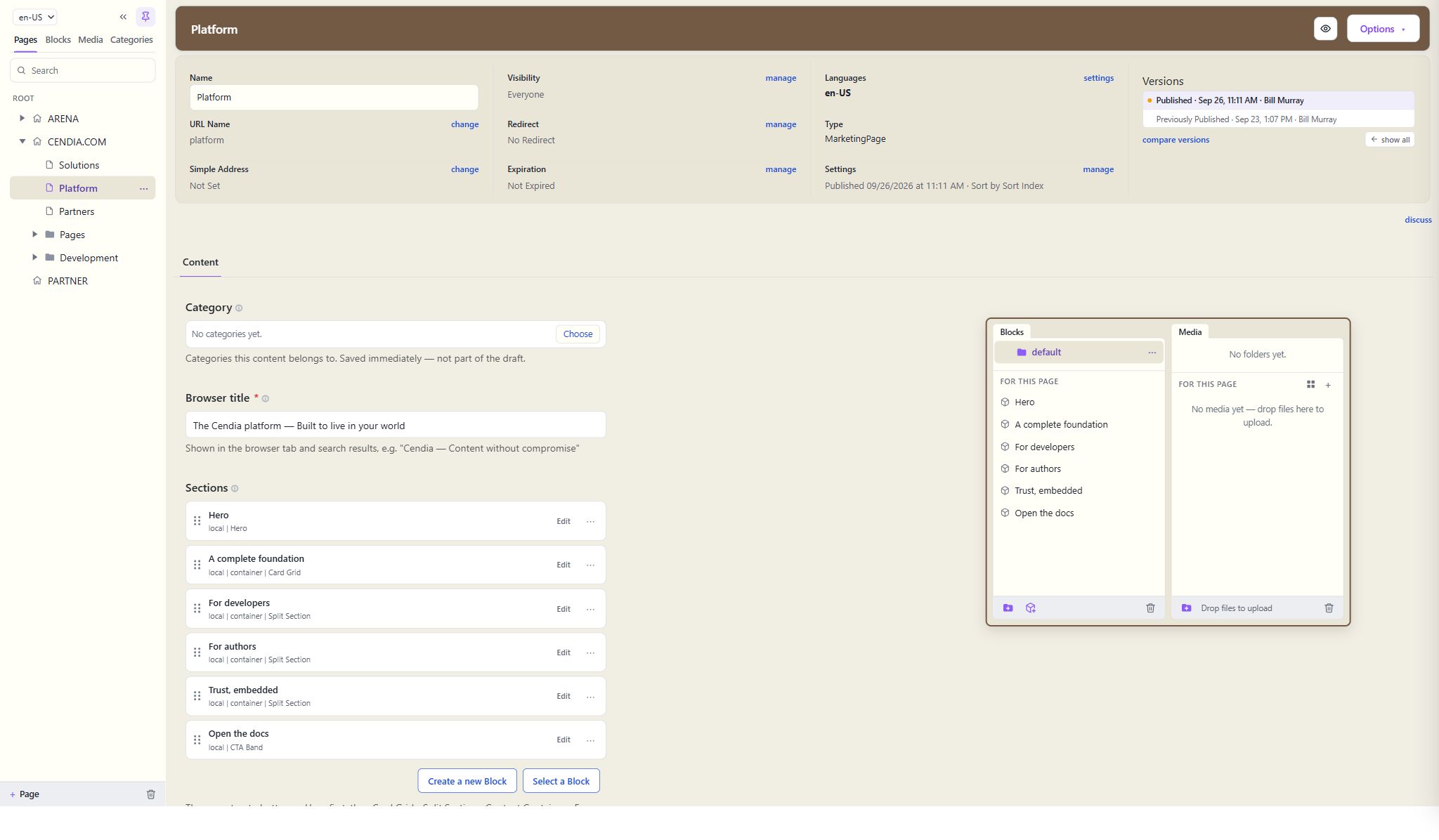
The real workspace: site tree, page settings, version history and content sections.
A complete foundation
Authoring and content delivery run inside your application. Choose your hosting, configure the services you need, and keep your models and templates in your repository.
Manage pages, blocks, media and forms alongside releases, tasks and scheduling. Content permissions control what each author can access.
SQL Server holds the content; media lives on local disk or in Azure Blob Storage. Deploy it the way you deploy any ASP.NET Core app.
Content types are C# classes, with attributes for fields, tabs and validation. Schema changes arrive with your code, in the same pull request.
Set content permissions, share signed previews and configure request limits. CMS author accounts stay separate from your website’s visitor accounts.
For developers
Register Cendia’s services with AddCendia, configure SQL Server, and map its routes with MapCendia. Your team owns the content types, templates and application deployment.
// Cendia fits inside your application.var builder = WebApplication.CreateBuilder(args); builder.Services .AddDbContext<CmsDbContext>(o => o.UseSqlServer(connectionString)); builder.Services.AddCendia(o => builder.Configuration .GetSection("Cendia").Bind(o)); var app = builder.Build();app.MapCendia();The core registration: configure SQL Server, add Cendia services and map the CMS routes. Follow the getting-started guide for the full application setup.
For authors
Developers choose the fields, tabs and blocks each page type needs. Authors can save drafts, assemble allowed blocks and preview changes in the real site before publishing.
Edit content in generated forms, arrange blocks in zones, and preview changes through your site’s templates.
Versions with compare, releases that publish many pages at once, tasks, scheduling and expiry.
Content permissions, edit locks and signed preview links help your team coordinate changes before launch.
Reuse shared blocks across pages and manage local content where it belongs. Search for pages, blocks and media with results filtered by content permissions.

Trust, embedded
Control who can edit and publish, share signed previews before launch, and compare or restore saved content versions. Configure request limits and visitor tracking for your deployment. External-service credentials cannot be read back through the CMS.
PLATFORM FOUNDATION
Explore with a real foundation